Pagination SEO is the practice of structuring and optimizing multi-page content sequences, such as product grids, blog archives, or forum threads, so search engines can crawl, index, and understand them correctly.
Get this wrong and pages quietly disappear from search. Get it right, and every page in the sequence pulls its own weight.
A handful of practices decide the outcome:
- Unique URLs: Give every page in the sequence its own address, like ?page=2 or /page/2/, so crawlers treat it as a separate, indexable page.
- Self-referencing canonicals: Point each paginated page's canonical tag at itself instead of back to page one.
- Real HTML links: Use standard <a href> tags for "next" and "previous," not JavaScript-only click handlers that crawlers can miss.
- Avoid URL fragments: Skip hash-based navigation like #page2, since crawlers generally ignore anything after the hash and never find those deeper pages.
- Never noindex unique pages: Keep page two and beyond indexable whenever they hold products or posts not found anywhere else on the site.
Most sites still get two or three of these wrong, often because they're following advice that stopped working years ago.
This guide breaks down exactly how Google treats paginated pages in 2026, why old fixes like rel="next" and rel="prev" no longer help, and what to check first when your deep pages aren't showing up in search.
If your pagination setup still feels like a guessing game, working with an established SEO company in Dhaka can help you catch these issues before they cost you rankings.
What Is Pagination in SEO
Pagination in SEO means splitting a large set of content across several numbered pages instead of cramming it all onto one URL.
It keeps pages fast to load and easy for both readers and search engines to move through.
You see pagination everywhere online. Online stores split hundreds of products across pages like /shoes?page=2 or /shoes/page/3/.
Blogs break years of posts into /blog/page/2/. Forums split long threads so page one loads fast. Review sections cut hundreds of customer reviews into smaller chunks, and busy comment sections do the same once a post gets popular.
Each of these pages needs to work on its own.
It should have a unique URL, load on its own, and return a normal 200 status with real, readable HTML content. This last point matters more than most site owners think, because how you set this up decides whether pagination helps your rankings or quietly drags them down.
Is Pagination Good or Bad for SEO
Pagination is not good or bad by itself. The setup decides the outcome.
Two sites can use the same page-splitting pattern and land in very different places, with one site ranking every category page and the other stuck with thousands of "crawled but not indexed" pages in Search Console.
Done well, pagination pays off fast.
Splitting a 500-product category into pages of 30 to 40 items keeps load times quick, which matters for Core Web Vitals and for how users feel using your site.
It also gives crawlers a clear path through your content instead of forcing them to load one huge, slow page.
If you set it up right, each page can even rank for its own long-tail searches, giving you more doors into search results instead of just one.
Done poorly, pagination causes real damage.
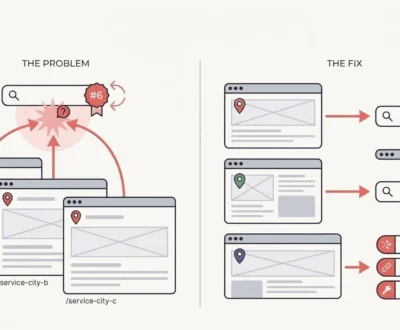
The biggest issue is duplicate content, where several pages show almost the same boilerplate text with only the product grid changing.
Wasted pagination crawl budget is another cost, especially when deep pages exist but aren't linked well, so Googlebot has to guess if they even matter.
Orphaned pages, like page 8, page 12, or page 20, often never get crawled at all when internal linking is weak, so products or posts on those pages simply vanish from search.
How Google Actually Treats Paginated Pages Today
This is where most guides still get it wrong.
Google treats every paginated URL like any other normal page. There's no special pagination category inside Google's index.
Page 2 of your category gets judged the same way page 1 does, based on content quality, internal links, and relevance to what people are searching.
The biggest myth still floating around is rel="next" and rel="prev".
Google dropped support for these tags as a ranking or indexing signal back in March 2019. They no longer affect how Google crawls, indexes, or groups your paginated pages together.
If your site still has them, leaving them in place won't hurt you. Bing still reads them, and they give a small accessibility boost for screen readers, but don't count on them to fix anything.
The second correction matters even more.
Stop pointing every paginated page's canonical tag back to page 1. This used to be common advice, based on the idea that it would pool "link equity" onto the main page.
In reality, this tells Google that pages 2, 3, and 4 are just copies of page 1, and Google often drops those pages from the index completely, taking any unique products or posts on them along with it.
The same problem shows up when you canonicalize to a "View All" page while your paginated pages still hold unique, indexable items.
Unless you actually want those deeper pages left out of search, each page should point its canonical tag at itself.
Pagination SEO Best Practices
Getting pagination right comes down to a short list of technical on-page SEO factors, and most sites only get two or three of them correct. Here's what actually moves the needle.
Give Every Page a Unique, Crawlable URL
Use query parameters like ?page=2 or clean paths like /page/2/.
Both work fine for Google as long as you stay consistent across the whole site. Skip URL fragments like #page2, since crawlers generally can't treat them as separate, indexable pages.
Also avoid stuffing session IDs into paginated URLs, since this creates endless duplicate URL versions that burn through crawl budget for no reason.
Getting URL structure right here connects back to the basics too, the same way picking an SEO friendly domain name sets the foundation for everything built on top of it.
Use a Self-Referencing Canonical Tag on Every Page
Page 2 needs a canonical tag pointing to page 2, not page 1. Page 3 points to page 3, and so on down the line. This single fix matters more than almost anything else in pagination best practices for 2026, and it's also the one site owners get wrong most often.
Link Pages With Real Anchor Tags, Not JavaScript-Only Handlers
Pagination controls like "Next," "Previous," and numbered links need to exist as real <a href=""> elements in the server-rendered HTML.
They shouldn't only work as JavaScript click events that fire in a browser.
Crawlers can read JavaScript, but it's slower, less reliable, and eats up extra crawl resources. Deep pages should link back to page 1 too, so the whole chain stays connected instead of running one way.
Pro Tip: Test this by viewing your page's raw HTML source, not just what shows up on screen.
If the pagination links only appear after the page fully loads in a browser, a crawler might miss them entirely.
Never Noindex Paginated Pages That Hold Unique Items
If page 5 of your category has products found nowhere else on the site, noindexing that page removes those products from search completely.
Save noindex for pages that are genuinely low-value or duplicate, and if you do use it, pair it with follow so link equity can still pass through the page.
Don't Over-Engineer Titles and Meta Descriptions Per Page
You don't need a hand-written meta description for every single paginated page.
A light touch is enough. Adding "Page 2" or "Page 2 of 14" to the title tag stops exact-duplicate title issues without wasting hours writing custom copy for every page in a long series.
Pick a Sane Items-Per-Page Count
Google's general guidance for online stores points to roughly 24 to 48 items per page as the sweet spot.
Fewer than that creates unnecessarily long pagination chains, since a 1,000-product catalog at just 12 items per page turns into 83 pages instead of 21 to 42.
More than 48 items risks slower load times and a clunkier experience for shoppers. Weigh this number against your own page speed testing rather than picking a number out of thin air, especially if your category pages carry a lot of product photos.
Pagination vs Load More vs Infinite Scroll vs View All
Every pattern trades off differently between user experience and crawlability.
Blogs and product catalogs do best with classic pagination, while mobile-first feeds lean on load more or infinite scroll, as long as real URLs still exist underneath. Here's how they compare.
| Pattern | Best fit | SEO requirement | Main watch-out |
| Classic pagination | Blogs, product catalogs, SEO-first sites | Unique URLs with real <a href> links | Can feel dated on mobile without good UX polish |
| Load more | Mobile-first feeds, moderate-sized lists | Persistent per-chunk URLs plus History API | Default JS-only loading hides content from crawlers entirely |
| Infinite scroll | Social feeds, news streams, visual browsing | Server-rendered chunk URLs plus History API | Burns crawl budget fast if no discrete URLs exist underneath |
| View all | Small catalogs under roughly 100 items | Single canonical URL | Becomes a performance liability once the dataset grows |
The fix for both load more and infinite scroll SEO problems is the same.
Set up persistent, per-chunk URLs behind the scenes, and use the History API to update the visible URL as users scroll or click through.
This way, users still get the smooth, interactive feel they expect, while crawlers find real, indexable URLs for every chunk of content.
Load more SEO setups that rely on pure JavaScript with no underlying URL structure are the single biggest reason infinite-scroll sites lose their deep-page visibility.
Faceted Navigation Is a Different Problem Than Pagination
Pagination and faceted navigation SEO issues get lumped together all the time, but they solve different problems and need different rules.
Pagination splits one set of items into pages in order. Faceted navigation, meaning filters for color, size, or price range, creates entirely new sets of items through combinations like ?color=red&size=large.
Not every filter combination deserves its own indexed page.
High-value combinations that match real search intent, like "red running shoes," can justify their own indexable canonical URL, since people actually type that phrase into Google.
Low-value or overly narrow combinations, like five filters stacked together that return three results, should either stay hidden from search through noindex and follow, get folded into another URL through canonical consolidation, or return a clean 404 if the combination is genuinely empty.
Left unchecked, filter URLs multiply fast.
A category with 10 colors, 8 sizes, and 5 price ranges can generate thousands of unique filter combinations, and Googlebot will try to crawl every single one if nothing stops it.
This quietly drains crawl budget away from the pages that actually deserve to rank.
Should Paginated Pages Be in Your XML Sitemap
The balanced answer is that it's usually unnecessary if your internal linking is solid, but adding the first few pages helps when linking is weak, or your catalog is genuinely large.
If your homepage, category hubs, and site navigation already link deep into your paginated series, Google will find those pages through normal crawling without any help from a paginated sitemap.
This runs against the absolute "never include paginated pages in your sitemap" rule some sites preach.
That rule ignores real situations, like a brand-new site still building up crawl trust, or a massive catalog where deep pages sit several clicks away from the homepage.
In cases like these, including pages 1 through 4 in the sitemap genuinely speeds up discovery and indexing. If you're unsure whether search engine submission still matters for your site, this is exactly the kind of situation where it does.
Common Pagination Mistakes That Still Hurt Rankings
A handful of errors show up again and again in audits, even in 2026.
Canonicalizing every paginated page back to page 1 remains the most damaging mistake, since it tells Google to ignore everything past the first page.
Mixing URL formats across one site, like ?page=2 on one section and /page-3/ on another, confuses both crawlers and your own internal linking.
Blocking pagination in robots.txt while also setting canonical tags on those blocked pages sends mixed signals that Google has to guess how to resolve.
Watch Out: Product and article links hidden behind onclick handlers with no real href attribute stop crawlers from ever discovering those pages, no matter how good the content on them is.
Identical boilerplate copy repeated word for word across every paginated page, with zero unique value beyond the product grid, invites Google to treat the whole set as thin or duplicate content.
How to Audit Your Site's Pagination
A practical audit covers five core checks, and running through them takes less time than fixing the damage afterward.
Step 1: Crawl for real discoverability
Crawl the site with a tool that mimics Googlebot to confirm deep pages are actually reachable through real links, not just accessible if you already know the URL.
Step 2: Compare raw HTML against rendered HTML
Check for pagination links that only appear once JavaScript finishes running. If they're missing from the raw HTML, crawlers may never see them.
Step 3: Verify canonical tags in Search Console
Use the URL Inspection tool to confirm each paginated page points to itself instead of pointing back to page one or somewhere else.
Step 4: Test out-of-range pages
Request something like page 999 and check whether your site returns a clean 404 or an awkward empty page that could confuse crawlers.
Step 5: Review the Page Indexing report
Look for pagination-related exclusions, like "duplicate, submitted URL not selected as canonical." This almost always points to a canonicalization mistake.
Running this alongside a full website auditing checklist catches pagination problems before they spread to the rest of your technical SEO.
Pagination and AI Search
Clean, crawlable pagination doesn't just matter for classic Google rankings anymore.
It directly affects how AI Overviews and other AI search systems find and cite your content.
These systems need to pull specific, complete pages to build accurate answers and give proper credit back to your site.
Fragmented or JavaScript pagination with no real URLs underneath makes it harder for AI crawlers to grab the correct, complete page instead of a broken fragment or the wrong page entirely.
There's no special AI-only fix needed here, and that's good news.
You don't need an llms.txt file, unnatural content chunking, or extra AI-specific markup layered on top of your existing setup.
The same fundamentals that make pagination work for regular Google indexing- meaning unique URLs, real links, self-referencing canonicals, and no JS-only navigation- are exactly what make your content retrievable and citable by AI search too.
Getting pagination right comes down to consistency.
Pick one clear URL pattern, use honest canonical tags, and connect every page in the sequence with real, crawlable links.
Sites that follow these fundamentals see their deeper pages get indexed, capture more long-tail searches, and end up with cleaner Page Indexing reports, while sites still following advice from 2015 keep losing visibility on content that should be ranking.
Pagination SEO Questions People Actually Ask
Does Google still use rel=next and rel=prev?
No, Google dropped this as a ranking or indexing signal back in March 2019.
Should paginated pages canonicalize to page 1?
No, each page should carry a self-referencing canonical pointing to itself.
Is infinite scroll bad for SEO?
Not if it uses persistent per-chunk URLs and the History API, but pure JavaScript loading with no URLs underneath hurts visibility.
Should filtered or faceted pages be indexed?
Only high-value combinations that match real search intent, like "red running shoes," deserve their own indexable URL.
How many items should I show per page?
Roughly 24 to 48 items per page works best, balanced against your own page speed testing.
Should paginated pages be noindexed?
No, not if they hold unique products or posts, since noindexing them removes that content from search entirely.
Ruth Carol is a professional SEO expert providing services concerning to search engine optimization process. She has 10 years long experience with vast knowledge in the field of modern search engine optimization process and is continuing. Her educational background, along with her working experience in this field, enables her to gain ample knowledge in this subject area. She was an active volunteer in google serve program and a regular blog writer subjecting SEO optimization process and special tips. Follow her blogs on seoviser. Besides, she is an active member of the Chang Mei International SEO Conference. Furthermore, she is the founder of SEO Viser, which is an SEO agency providing SEO solutions all over the world. She aims to help companies ranging from small to big to develop a long-lasting solution to rank their site. Apart from that, she provides consultancy services related to search engine optimization and contributing to social media and online platforms like Fiverr, Upwork, etc. To know more about her services and anyone can visit seoviser or simply email her through her website. She is a great mind and loves to share knowledge. Contact her at seoviser.
OUR SERVICES


Request a free quote
We offer professional SEO services that help websites increase their organic search score drastically in order to compete for the highest rankings even when it comes to highly competitive keywords.
More from our blog
See all posts