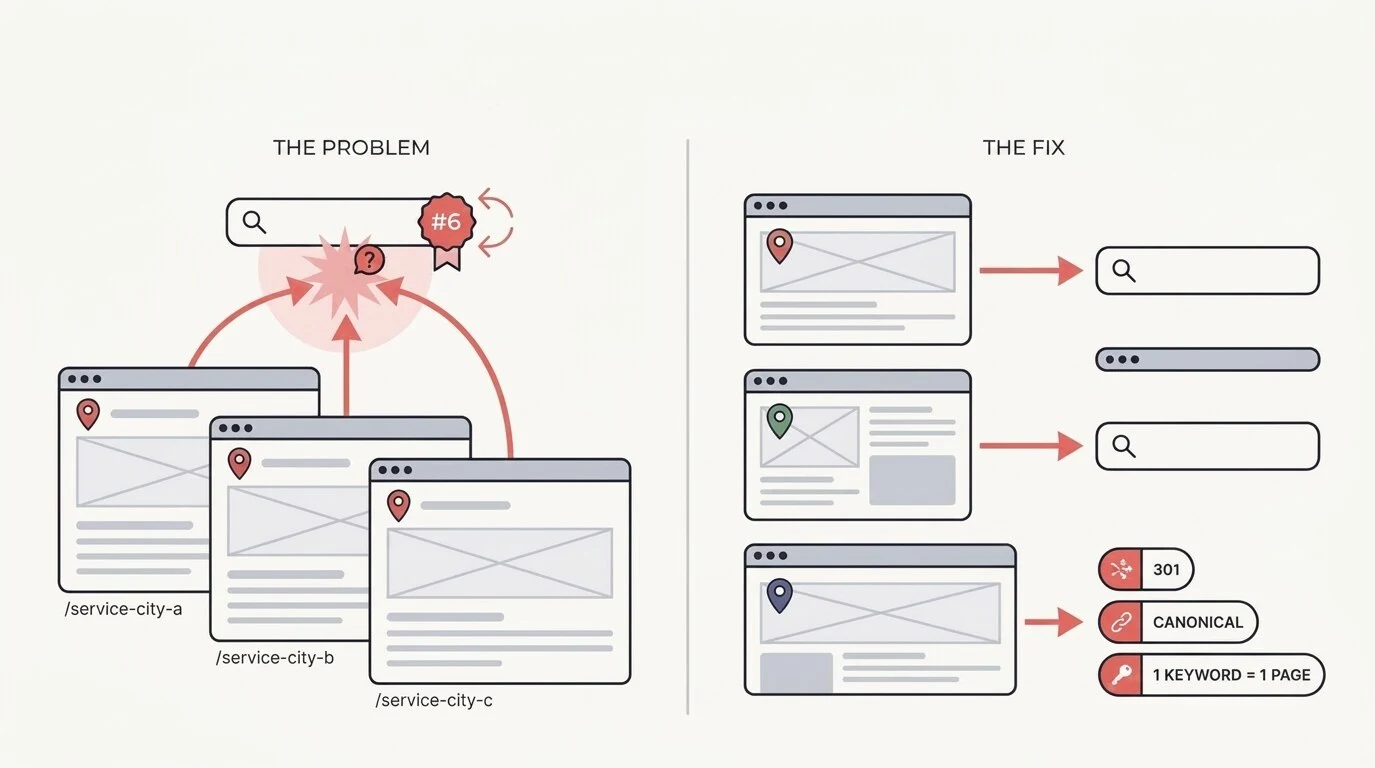
To fix location page keyword cannibalization, assign each page one primary geo-modified term, identify overlapping URLs in Google Search Console using query filters, and resolve competition by consolidating pages with 301 redirects, differentiating local intent, or applying canonical tags.
Multi-location businesses often sabotage their search presence when team members miss where local SEO vs SEO strategies diverge. Instead of competing with rivals, your own location pages fight each other for the same terms, causing rankings to wobble while Google decides which URL to show.
Spotting this issue early ensures every page owns its market. Cannibalization also rarely travels alone, so if several pages are underperforming at once, a complete website audit process will show whether the overlap is the real cause or just the symptom you noticed first.
What Cannibalization Actually Looks Like on Location Pages
In easy words: two of your own pages are ranking for the same query, splitting clicks and confusing Google about which one it should show. That's it.
You don't need the textbook definition to recognize it; you need to know the symptoms that actually show up on your dashboard.
Here's what business owners usually notice first:
- Pages swap positions week to week. Your Dhaka page ranks #6 on Monday, then your Chittagong page shows up at #6 the next week for the exact same search term, while the Dhaka page drops out of the top 10 entirely.
- The wrong page wins. A thinner, less useful page starts outranking the one you actually built for that market, and it keeps winning even after you improve the "better" page.
- Both pages get stuck. Instead of one page reaching page 1, both sit on page 2, each one holding the other back.
It's worth separating this from duplicate content because the two are often confused. Duplicate content is a quality problem (Google sees near-identical text across pages and isn't sure which version to index).
Cannibalization is a ranking-competition problem (Google indexes both pages fine, but can't decide which one deserves the click for a given query). A page can have one issue without the other.
Two location pages can be 100% unique in wording and still cannibalize each other if they both chase the same head term. Location pages competing with each other are usually a targeting problem long before it's a writing problem.
How to Diagnose It in Search Console (Not Just Guess)
Most guides stop at "cannibalization is bad, avoid it." That's not useful if you already have 15 location pages live and no idea which ones are colliding. Here's how to actually confirm it using Google Search Console.
Step 1: Open the Performance report. Go to Search Console, then Performance under the Search Results tab.
Step 2: Switch to the Pages tab. This lists every URL on your site that earned impressions, ranked by traffic.
Step 3: Filter by a specific query. Click "+ New" and add a Query filter for one of your target terms, something like "AC repair Dhanmondi." Then look at which pages picked up impressions for that exact query.
Step 4: Check for overlap. If two or more of your own URLs are getting impressions for the same query, that's your confirmation. It's no longer a guess.
A real cannibalized query pattern usually looks like this: URL ‘A’ shows impressions for "AC repair Dhanmondi" in week one, URL ‘B’ shows impressions for the same query in week two, then URL ‘A’ comes back the week after.
That alternating pattern, rather than one page consistently owning the query, is the clearest signal that Google itself doesn't know which page to trust.
If you want a faster first pass before diving into query filters, run a simple site: operator search, like site:yourdomain.com "AC repair Dhanmondi". It's a lighter-weight check that shows you every indexed page Google associates with that phrase, which is often enough to flag a problem worth investigating properly in Search Console.
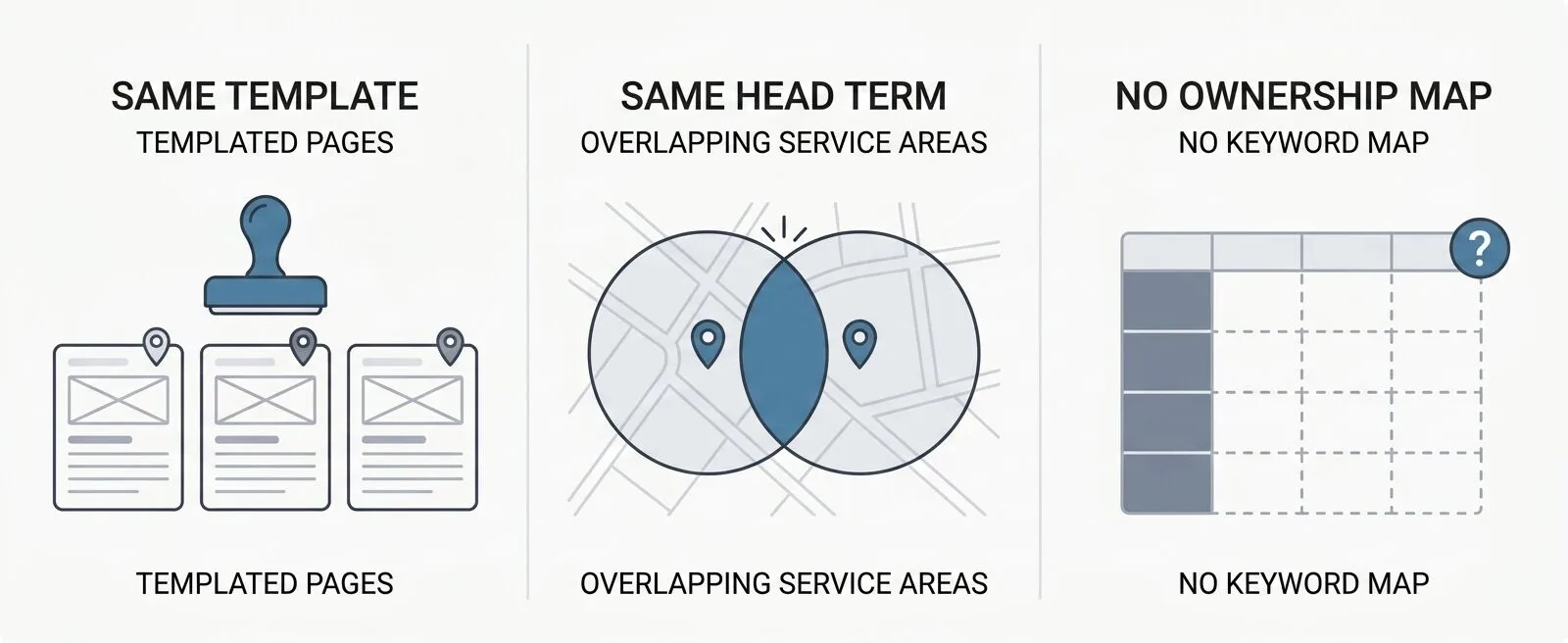
Cannibalization traces back to a planning gap, not an algorithm quirk.
The Root Causes (It's Rarely Just "Bad Luck")
Cannibalization almost always traces back to one of three planning gaps, not bad luck or a Google algorithm quirk.
Cause 1: Templated pages with the city name swapped.
If every location page uses the same H1 pattern, the same title tag structure, and the same paragraph order with only the city name changed, you've built duplicate location page content by design. Google treats these as interchangeable, and interchangeable pages compete rather than complement.
Cause 2: Overlapping service areas.
Two nearby location pages both target the same head term instead of splitting citywide intent from neighborhood intent. A page built for "electrician Dhaka" and a page built for "electrician Gulshan" should not both be optimized around "electrician Dhaka," yet this happens constantly when pages are built in isolation, months apart, by different people.
Cause 3: No keyword ownership map.
Nobody assigned which page owns which query before both pages were built. This is the root cause behind the other two. Without a map, duplication and overlap aren't exceptions; they're inevitable as the site grows.
The One-Keyword-One-Page Rule
Here's the fix that prevents most of this before it starts: every location page gets exactly one primary geo-modified keyword, no exceptions. This is the one-keyword, one-location page rule, and it's the single biggest lever for keeping a growing location network out of its own way.
In practice, this means building a keyword map before you publish anything new. A simple spreadsheet works fine:
| City / Area | Primary Keyword | URL | Secondary Terms |
| Dhanmondi | AC repair Dhanmondi | /ac-repair-dhanmondi | AC servicing, gas refill Dhanmondi |
| Gulshan | AC repair Gulshan | /ac-repair-gulshan | Split AC installation in Gulshan |
| Uttara | AC repair Uttara | /ac-repair-uttara | AC maintenance Uttara |
Before publishing a new location page, run through a standard local SEO checklist and cross-reference your proposed URL against the query filter method described above.
If the primary keyword you're about to target already belongs to another URL, stop and reassign it to a more specific variant (a neighborhood term instead of the citywide one, for example) before the page goes live.
Keyword mapping for location pages takes an afternoon to set up and saves months of untangling later.
How to Fix Pages That Are Already Cannibalizing Each Other
If you're past prevention and already dealing with two pages competing, there isn't one universal fix. Treat it as a decision tree, because the right move depends on why the overlap happened.
Option 1: Consolidate and 301 redirect.
Use this when the two pages genuinely serve the same market, and there's no real reason for both to exist (say, a citywide page and a near-identical neighborhood page for an area too small to justify its own page).
Consolidate the stronger content into a single URL, then 301-redirect the weaker page. If you are using affordable local SEO services, this consolidation step is usually one of the first structural fixes an agency will implement.
Option 2: Differentiate and re-scope one page.
Use this when both markets are genuinely real, but the pages read too similarly right now. Narrow one page's intent, for example, shift it from general service coverage to a specific niche within that area. Add distinct local proof, such as area-specific staff, unique case studies, local reviews, and links to verified local SEO citations for that specific geographic area.
When both pages pull from the same thin review pool, knowing how to get more Google reviews becomes essential for building distinct, location-specific social proof, making the pages easy to distinguish even if the city name is removed.
Option 3: Canonical to the stronger page.
Use this when one page is a legitimate near-duplicate of the other, most often a legacy URL kept around after a site migration or rebrand. Add a canonical tag pointing to the page you want indexed, so Google consolidates ranking signals onto the version that matters. Check back in Search Console afterwards, because a canonical is a hint rather than an instruction and Google sometimes picks a different URL than the one you declared.
A short way to decide: if the two pages shouldn't both exist, consolidate. If they should both exist but don't currently read differently, differentiate. If one is just old baggage, canonicalize it.
The Service-Area Business Exception
Service-area businesses experience service-area page cannibalization differently because of how profile management works, making thorough Google Business Profile optimization essential, alongside page-level fixes.
Google caps a single GBP listing on one profile, with up to 20 service areas, and requires businesses without a public storefront to hide their address.
That structure creates a trap. Building a dedicated location page for each of those 20 service areas, especially with thin, templated content, is one of the fastest routes to both cannibalization and doorway-page local SEO problems, where Google sees a wall of near-identical pages built purely to capture search traffic rather than serve a genuine local audience.
Google's guidance on doorway pages treats this pattern as a policy risk, not just a ranking inefficiency.
For SABs, it's usually smarter to build fewer, deeper location pages for the areas that generate real revenue, and let the GBP service-area settings, rather than a dedicated URL for every suburb, handle the long tail of coverage.
Preventing It as You Add New Locations
Once you've cleaned things up, the goal shifts to keeping it that way as the location network grows.
Treat the keyword map as a living document. Every new page gets checked against it before publishing, not after. This is a five-minute step that prevents the exact overlap that caused the original problem.
Split content into fixed and variable sections. Build a template in which certain elements (service descriptions, process explanations, credentials) remain consistent, while location-specific elements (neighborhood references, local case studies, staff details, embedded maps) vary by page. This keeps pages efficient to produce without collapsing into templated duplication.
Practice internal linking discipline. A location page should link to pages relevant to its own market, its parent service page, and directly related nearby coverage where genuinely useful, not to every nearby city page indiscriminately. Over-linking between similar pages just reinforces the confusion you’re trying to fix, which is the same dilution that breaks clusters built around a central page.
Keep citations consistent as you add locations. Every new location page usually means a new round of directory listings, and inconsistent NAP details across those citations can muddy the same signals you just cleaned up.
Location page cannibalization is a planning failure, not a penalty. Once you can diagnose it in Search Console, understand why it happened, and know which fix applies, keeping a growing location network out of its own way becomes routine maintenance instead of a recurring mystery.
If you are unsure where to start, stepping back to evaluate your broader site architecture through a local-SEO vs. SEO lens can clarify which location pages actually need to exist. And if untangling an overlapping location network on your own feels like more than you have time for, our technical SEO audit service covers the diagnosis and the structural fixes across the whole page set.
Frequently Asked Questions
Why are my location pages ranking against each other instead of competitors?
This happens when two or more of your pages target the same query without a clear ownership assignment. Google can't tell which is more relevant, so it alternates between them rather than consistently ranking one over the other.
Should I merge or redirect duplicate location pages?
If both pages serve the same market and there's no real reason for two separate URLs, yes. Consolidate the stronger content into one page and 301 redirect the other. If both markets are genuinely distinct, differentiate the pages rather than merge them.
How many location pages should a service-area business create?
Fewer than you'd think. Build dedicated pages only for areas that generate real revenue, and let your Google Business Profile's service-area settings cover the rest. Building a page for all 20 possible service areas usually creates more cannibalization risk than it's worth.
Does Google penalize duplicate location pages?
Not with a manual penalty in most cases, but duplicate or templated pages get filtered, consolidated, or dropped from the index algorithmically, and near-duplicate pages built purely to capture search traffic can trigger doorway page issues.
Ruth Carol is a professional SEO expert providing services concerning to search engine optimization process. She has 10 years long experience with vast knowledge in the field of modern search engine optimization process and is continuing. Her educational background, along with her working experience in this field, enables her to gain ample knowledge in this subject area. She was an active volunteer in google serve program and a regular blog writer subjecting SEO optimization process and special tips. Follow her blogs on seoviser. Besides, she is an active member of the Chang Mei International SEO Conference. Furthermore, she is the founder of SEO Viser, which is an SEO agency providing SEO solutions all over the world. She aims to help companies ranging from small to big to develop a long-lasting solution to rank their site. Apart from that, she provides consultancy services related to search engine optimization and contributing to social media and online platforms like Fiverr, Upwork, etc. To know more about her services and anyone can visit seoviser or simply email her through her website. She is a great mind and loves to share knowledge. Contact her at seoviser.
OUR SERVICES


Request a free quote
We offer professional SEO services that help websites increase their organic search score drastically in order to compete for the highest rankings even when it comes to highly competitive keywords.
More from our blog
See all posts