Robots.txt for SEO: Complete Syntax Guide and Critical Mistakes to Avoid
- September 29, 2026
- SEO
Robots.txt for SEO is a plain-text file placed at your site's root that tells search engines and AI crawlers exactly which pages, folders, or file types they may request and which to skip. It controls crawling, not indexing, so a blocked page can still appear in Google's results without a snippet if other pages link to it. Get the syntax wrong, and this one file can quietly cut off your entire site from search visibility overnight.
Cloudflare's 2025 review of its top 10,000 websites found that only 37% had a robots.txt file.
That gap matters more than most site owners think, because this file decides which parts of your site search engines and AI tools even get to see, and getting it wrong can block your own money pages from Google or leave your content open to AI training crawlers you never agreed to feed.
Any experienced seo services agency checks this file before touching anything else on a client's site. In this blog, we will cover the syntax that actually works and the mistakes that quietly cost sites their rankings.
What Robots.txt Actually Controls
Robots.txt manages crawling, not indexing. It's a public request that well-behaved bots choose to follow, not a lock that keeps anyone out. A search engine can still list a blocked URL in its results if enough pages link to it, just without a description, because it never reads the page.
The file must be at the exact root of your domain, saved as plain text in UTF-8, with the filename in lowercase. A copy elsewhere, like /blog/robots.txt, is ignored completely. This is one on-page SEO factor that trips up more sites than it should, mainly because it looks too simple to bother testing.
Crawl budget is the other piece. Search engines only spend so much time crawling any one site, and on large sites, that budget runs out fast without a clear direction. Each subdomain also needs its own file: blog.yourdomain.com and yourdomain.com are separate hosts, so rules on one never apply to the other.
Robots.txt vs. Meta Robots vs. X-Robots-Tag
These three get mixed up constantly, and that's where many robots.txt mistakes start. Robots.txt stops crawling. Meta robots tags and the X-Robots-Tag header stop indexing. That's the one rule to remember before anything else.
| Tool | What It Controls | Where It Lives | Applies To |
| Robots.txt | Crawling only | Root file (yourdomain.com/robots.txt) | Whole site, paths, or file types |
| Meta Robots Tag | Indexing, link-following | <head> of an HTML page | HTML pages only |
| X-Robots-Tag | Indexing, link-following | HTTP response header | Any file type, including PDFs and images |
If you block a page in robots.txt, Google never sees a noindex tag on it, because it never crawls the page to read that tag. That's why blocked pages sometimes still show up in search results with no snippet at all.
Complete Syntax Reference
Every robots.txt file is built from a handful of directives, and getting the robots.txt syntax right matters more than memorizing every rule that exists.
- User-agent targets a specific crawler or all crawlers with a wildcard (*). Named bots include Googlebot, Googlebot-Image, Bingbot, Slurp, and Baiduspider.
- Disallow blocks a path: Disallow: /checkout/ stops crawling of everything under that folder.
- Allow carves an exception to a broader block, such as allowing a single blog post within a folder that's otherwise disallowed.
- Sitemap points to the actual sitemap file, not the domain root; for example, Sitemap: https://yourdomain.com/sitemap.xml. You can list more than one, and the line only needs to appear once. This robots.txt sitemap directive is a free way to help crawlers find your content faster, and skipping it is a missed opportunity.
The file also has hard limits. Google enforces a 500KB size cap, and content past that point is simply ignored. Wildcards keep files short: * matches any sequence of characters, and $ marks the end of a URL, so Disallow: /*.pdf$ blocks every PDF on the site in one line.
When an Allow and a Disallow rule conflict, the most specific path wins, which is the core logic behind robots.txt disallow vs allow decisions.
What Robots.txt Does Not Support (Despite Popular Templates)
Plenty of robots.txt templates online include directives that simply don't work anymore, and copying one blind is how sites end up with silent gaps in their setup.
Robots.txt noindex is the biggest offender. Google dropped support for it years ago, so a Noindex: line does nothing. Use a meta robots tag or an X-Robots-Tag header instead.
Crawl-delay is another one worth checking. Google ignores it completely and sets its own crawl rate based on how fast your server responds. Bing and Yandex still respect it, so it's only worth deleting if Google is your only concern.
Robots.txt also can't secure or hide anything. The file itself is publicly readable at yourdomain.com/robots.txt, so listing a private folder there tells anyone looking exactly where to find it.
And because the standard is voluntary, it has no legal weight: malicious scrapers ignore it by design, which is why sensitive data needs server-level protection, not a text file.
Handling AI Crawlers in Robots.txt
By 2026, AI crawlers will be cleanly split into two groups with very different roles. Training crawlers, including GPTBot, ClaudeBot, CCBot, Google-Extended, and Applebot-Extended, collect pages to train future models.
Retrieval and citation crawlers, including OAI-SearchBot, Claude-SearchBot, PerplexityBot, and ChatGPT-User, fetch pages in real time to answer a specific question and cite the source.
A site can opt out of one without losing the other. Blocking GPTBot while allowing OAI-SearchBot keeps your content out of OpenAI's training data but still makes it eligible to be cited in a ChatGPT answer.
This is the practical shape of a block AI crawler's robots.txt strategy for a business that wants AI visibility without handing over its content for free training.
The mistake worth watching: a broad Disallow: / rule, or a CDN's default "block all bots" setting, often catches citation bots along with training bots without anyone noticing. Check your file and your CDN's bot rules against both lists separately.
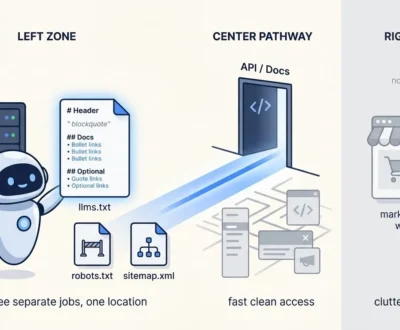
One more file gets mentioned alongside this topic: llms.txt, a proposed, separate file meant to help AI tools understand a site's key content, not a replacement for robots.txt. Adoption is still thin, so treat it as optional rather than essential.
Critical Mistakes That Break Rankings
Most robots.txt mistakes are one character away from fine. A few show up again and again:
- Blocking CSS, JavaScript, or images. Google needs these to render your page the way a visitor sees it. Block them, and Google may judge the page as broken even when it looks perfect in a browser. This connects directly to strategic image SEO: a blocked image folder means product photos never get evaluated at all.
- A misplaced Disallow: /. Often left over from a staging site, this single line blocks the entire domain from crawling. It's the single most damaging robots.txt error possible.
- Path matching errors. Rules are case-sensitive, and /folder and /folder/ are treated as two different paths, so a rule written for one won't touch the other.
- Using robots.txt to hide private data. As covered above, the file is public, so this backfires immediately.
- Managing duplicate content with robots.txt alone. Canonical tags handle duplicate content properly; robots.txt just stops the page from being read, which can make the problem harder to diagnose later.
Testing and Verifying Your File
According to the HTTP Archive’s Web Almanac 2025 analysis, 85% of robots.txt requests returned a valid HTTP 200 response, while 13% returned a 404 error.
A missing robots.txt file isn't a crisis. Google treats 4xx errors as permission to crawl everything, whereas 5xx server errors freeze crawling entirely. Serving even a minimal, fully open file avoids guesswork for the server and simplifies Search Console troubleshooting.
Search Console flags three main robots.txt issues: "Submitted URL blocked" (a sitemap link is restricted), "Blocked by robots.txt" (discovered but unindexed), and "Indexed, though blocked" (indexed via external links without reading page content, often hiding search descriptions).
Before deploying any change, check the live file directly at yourdomain.com/robots.txt and test specific URLs against it first. A five-minute check here prevents the kind of site-wide crawl block that can take weeks to recover from, which is exactly why on-page SEO only pays off when the technical foundation underneath it is solid.
Frequently Asked Questions
Does robots.txt directly improve rankings?
Not directly. It manages crawl efficiency rather than adding a ranking signal. A cleaner crawl budget helps Google find and re-crawl important pages faster, which indirectly supports rankings, especially on larger sites.
Can robots.txt keep a page out of Google's index?
Not reliably. Blocking a page stops Google from crawling it, but if other pages link to it, Google can still index the bare URL without reading its content. Use a noindex meta tag or X-Robots-Tag header to actually keep a page out of the index.
Does Google support the crawl-delay directive?
No. Google ignores crawl-delay entirely and sets its own crawl rate based on server response time. Bing and Yandex both respect it, so it still has a use if you're managing traffic from those crawlers.
Should I block AI crawlers in robots.txt?
It depends on your goals. Blocking training crawlers like GPTBot and ClaudeBot keeps content out of model training. Allowing retrieval crawlers like OAI-SearchBot and PerplexityBot keeps you eligible for citation in AI-generated answers, which is usually the better default for a business that wants visibility.
What happens if my site has no robots.txt file at all?
Google treats a missing robots.txt file (a 404 response) as full permission to crawl everything on your site. This is safer than a 5xx server error, which causes Google to temporarily pause crawling until the file is reachable, but publishing even a minimal robots.txt file remains the safest choice.
Though small, a single typo in this file can break your technical SEO. Test it before every deployment and update it regularly, especially as AI crawlers multiply, to ensure your site stays protected.
Ruth Carol is a professional SEO expert providing services concerning to search engine optimization process. She has 10 years long experience with vast knowledge in the field of modern search engine optimization process and is continuing. Her educational background, along with her working experience in this field, enables her to gain ample knowledge in this subject area. She was an active volunteer in google serve program and a regular blog writer subjecting SEO optimization process and special tips. Follow her blogs on seoviser. Besides, she is an active member of the Chang Mei International SEO Conference. Furthermore, she is the founder of SEO Viser, which is an SEO agency providing SEO solutions all over the world. She aims to help companies ranging from small to big to develop a long-lasting solution to rank their site. Apart from that, she provides consultancy services related to search engine optimization and contributing to social media and online platforms like Fiverr, Upwork, etc. To know more about her services and anyone can visit seoviser or simply email her through her website. She is a great mind and loves to share knowledge. Contact her at seoviser.
OUR SERVICES


Request a free quote
We offer professional SEO services that help websites increase their organic search score drastically in order to compete for the highest rankings even when it comes to highly competitive keywords.
More from our blog
See all posts