


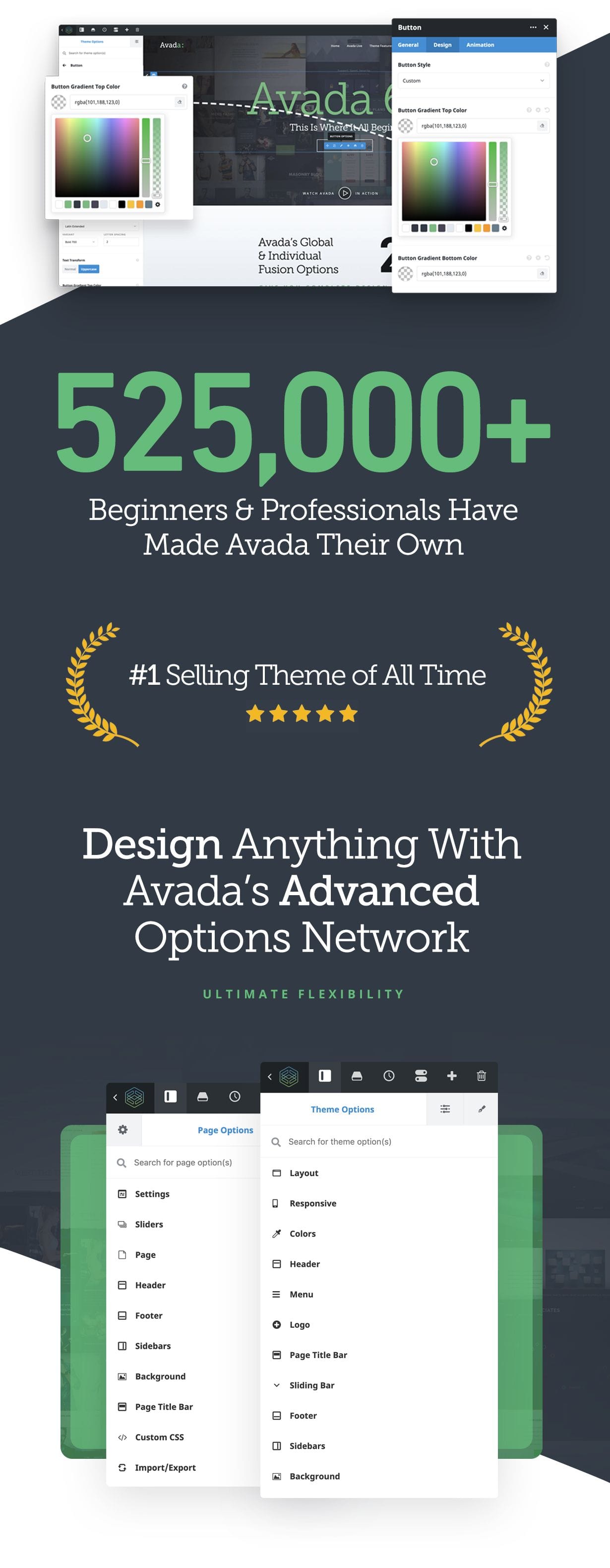
Fusion Theme Options control options and settings globally throughout the site, whereas Fusion Page Options control individual pages and posts. Individual page options give you the freedom to change anything on a single page or post that will thereby override the global Theme Options. The Avada Advanced Options Network gives you the ultimate flexibility to design and style layouts that are unique and stand out from the rest of the site.
Custom Page Templates & Page Options Included
- Customize each and every page easily through global theme options or individual page option overrides
- Use and of our 4 premium Sliders on every page or post
- Contact page template
- FAQ page template
- Sidebar Left or Right using Default Page
- 100% width page template for 100% of browser width
- Side Navigation page template
- Portfolio 1, 2, 3, 4, 5, 6 Columns with auto or cropped image sizes
- Control the column spacing between each column for added creativity and design flexibility
- Blank Page (perfect for Coming Soon or Maintenance Mode)pages
- Default page
- Built-In 404 Page
- Advanced page/post options to customize each page/post
Advanced Responsive Image Management
- Custom responsive image setup that automatically creates the best situation per image
- Intelligent image size generation so the best image size is used per layout
- This provides major performance enhancements due to optimal image sizes being used
Avada is Multi-Lingual/RTL Ready!
- Translation Ready, Includes the .po and .mo files
- Being translated into 30+ languages
- Built-In RTL support
- WPML plugin integration
- Polyang Support
- Each language you use with WPML gives you a full theme options panel to set options per language
- Deep integration with Avada and our technical teams means that your language needs are confidently taken care of.
Includes 30+ languages partially or fully translated, below are a few examples
- German – Deutsch (de_DE)
- Español – España (es_ES)
- Italian (it_IT)
- Dutch – Nederlands (nl_NL)
- Czech – Cestina (cs_CZ)
- French – Français (fr_FR)
- Polish – Polski (pl_PL)
- Turkish – Türkçe (tr)
- Portuguese (Brazilian) – (pt_BR)
- Portuguese (European) – (pt_PT)
- Chinese – Taiwan (zh_TW)
- Russian – Pyccknn (ru_RU)
- Swedish – Svenska (sv_SE)
- Catalan – Català (ca)
- Norwegian – Bokmal (nb_NO)
- And several more all controlled through a public repository on Github!
Advanced Typography Options!
- Use Google Fonts, Standard Fonts, or Upload Your Custom Font!
- You can upload unlimited custom fonts and use them all throughout the site
- All font options are controlled in the theme options panel
- Set different font sizes, families, margins, letter spacing and more for all fonts, H1-H6 headings, body, footer, sidebar, etc
- Set different colors for all fonts, H1-H6 headings, body, footer, sidebar, etc
- Set line-height values for each font type as well
- Font preview in theme options that shows all font settings live
Advanced Background Options
- Unlimited Backgrounds for boxed & wide mode, per page or post or global!
- Use a global theme option if you want the same image on every page
- Or upload a custom background image for each page or post in several areas
- Insert backgrounds in header, footer, main content area and background
- Options for 100% background image and background repeat options
- Full width sections allow background images with parallax effects and directions
- Page title bar backgrounds, with parallax effect and text fade effect
- Columns (1-6) each have a background image option also
Wide & Boxed Layout Versions
- Full control over site width; content area and sidebars
- Upload custom background images or colors per page or post (boxed version)
- Upload custom page title bar images or colors per page or post
- Choose 100% background image, or varying repeat options
- Choose boxed or wide mode per page or post
Advanced Header Options
- Select from 7 different header layouts, including mobile header layout options
- Headers can be top, left or right positions
- Choose what you display in the top left, top right and banner section
- Top Sliding Widget Bar, insert any widget, 1-6 columns, various theme options
- Includes a Sticky Header for more advanced usability, enable/disable via theme options
- Change colors for the varying elements in the header
- Select social icons to show in the header along with custom or brand colors, boxed or unboxed
- Fully control the size, shape, background padding and more for social icons
- Change the position of your logo; left, right, center
- Insert a custom background image in the header, or custom color
- Change all margins with ease via theme options
- Supports up to 5th level dropdown menus
- Many more customization options via theme options and page options
Advanced Page Title Bar
- Enable or disable the page title bar globally, or per page/post
- Options to set height, background image, parallax effect, background color, retina image per page or post or one global option
- Choose to show search bar or breadcrumbs on right side of page title bar
Advanced Footer Options
- Insert custom background image behind widgets
- 1-6 columns, insert any widgets into each column
- Back To Top button, enable disable in theme options
- Control the color of each section of the footer
- Various style options for disabling text shadow, social icons, etc
- Copyright bar, customize text and enable/disable via theme options
- Select social icons to show in the footer along with custom or brand colors, boxed or unboxed
- Fully control the size, shape, background padding and more for social icons
- Many more customization options via theme options and page options
Form Plugin Options
- Built in custom styles for the Contact Form 7 plugin
- Built in custom styles for the premium Gravity Forms plugin
Built-In Contact Form
- Built in form with ReCaptcha Spam Protection
- Uses Google Maps above form on contact page
- Custom Google Map Styling
- Set custom sizes for your map
- Use a sidebar with your contact page or have it full width
- Options easily selected and setup via theme options panel
Unlimited Single or Dual Sidebars
- Create custom sidebars for the various sections of the site
- Use single or dual sidebars on any page or post
- Sidebars can be positioned on left or right side
- Use any of our custom or built in widgets in any sidebar
- Set sidebars globally for each different area of the site like pages, posts, products, events, etc
- Set sidebars individually per page or post via the fusion page options
Beautifully designed Custom Widgets
- Twitter Widget
- Flickr Widget
- Facebook Widget
- Recent Works Widget (pulls from Portfolio Items)
- Contact Details Widget
- Advertising Ad Widget
- Social Links Widget
- Layer Slider & Revolution Slider Widget
- Horizontal Menu Widget
- Basic Text Widget which can take our short codes!
Advanced Search Options
- Show search icon in main menu that has popup search field
- Choose to search all pages and posts, or just posts
- Dedicated Search Results page
- Modern fly out search design for header 6
- Various theme options to customize search results, layouts, images, excerpts, etc
Side Navigation Page With Parent/Child Levels
- Select “on-hover” or “on-click” for side menu items
- Unlimited amount of side navigation sets can be made
- Control the side navigation width and other styles
- Can be used with single and dual sidebars
